

[Fixed!] Janitor AI Not Working (2025 Guide)


Updated on 24, July 2025
Notice: Starting July 24th at 11:59pm UTC, if you are accessing Janitor AI from the UK (England, Scotland, Wales, and Northern Ireland), you will hit a block page.
Hurray! “Janitor ai not working” issue can be fixed with mentioned solutions (with pictures).
For last two months, I have been using this platform just for fun.
For some reason, Janitor AI works slow, as I have noticed by myself.
Mainly, I got slow and cut off responses. First, I thought that maybe Janitor AI down, but that’s not the problem.
In this blog, I will briefly explain why Janitor AI not working along with fixes to solve this problem.
Table of Contents
Significantly, the reason for Janitor AI not working could be a server issue or network problem. For some reason Janitor AI plugged with server problems or downtime. Wait for resolve server issues by the community. It can take some hours or days, too.
Other reasons that could cause Janitor AI down could be:
🛠️ Maintenance or updates: Like other websites, the Janitor AI website undergoes maintenance or updates. At this moment, the accessibility of the website desist for some time. Might be the community plan to bring some important changes or address any technical issues.
🌐 Browser complications: Janitor AI website support or compatible with Google Chrome version 92 or above and Firefox version 91 or above. If you are trying to access Janitor AI on the browser below specified version, possibly Janitor AI not working could be related to browser complications.
🗄️ Server glitching: Unstable internet connection could lead to high ping or slow transfer of data packets to the server. This is called server glitching and might for these reasons you may experience Janitor AI not working or slow functioning.
Also read: Janitor AI: Understanding The Basics [Part 1]
Janitor AI lets users create NSFW fictional chatbot characters with implying unique personalities. What if you’re facing a problem with the NSFW functionality? It can be frustrating, you know!
Janitor AI NSFW not working can happen when it fails to fetch kobold or some technical details that are interrupted by an unstable internet connection.
Refresh the page you are working on or restart the device if the former doesn’t work. Alternatively, you can change the bot and provide new context with different capabilities to achieve the desired NSFW interactions.
Janitor AI API not working can happen by network connectivity issues or problems with the server hosting the website.
Moreover, API integration issues can also cause this problem in running. For example, data incompatibility, technological complexity, and improper api dependencies.
Rightful troubleshooting is important to solve Janitor AI API not working issues, quickly.
Look at the following troubleshooting solutions to fix Janitor AI not working issues.
In this section, you will learn how to fix Janitor AI not working issues. I believe that the following troubleshooting steps can help you to resolve the issue of the website failing to load.

Janitor AI is not working because you are potentially using an older version of your browser. Updating your browser to the latest version or trying different browsers such as Google Chrome and Firefox may help you solve this issue.
I personally suggest you to use Google Chrome for accessing Janitor AI as it’s compatible and millions of users are using it.
Most browsers updated automatically like Google Chrome and Safari are updated automatically. However, you can do it manually by checking the browser’s settings or preferences menu.
You can access tech support on Discord to solve Janitor AI not working troubleshooting and solutions. You can do it by visiting the official Janitor AI website. At the bottom of the website, you can find the Discord link there.

Click on the “tech-support” option and enter your query. You can begin with ‘Janitor AI not working on my browser’ as an example.
They can access the problem from your perspective and provide you with the rightful solutions.

Due to Firewalls and Antivirus software, it can be possible that they have blocked the Janitor AI website as potential threats. Open Firewall settings on your computer and unblocked (if being unintentionally blocked).
If you have Antivirus installed on your system, check that too. Ensure nothing blocked Janitor AI to get seamless accessibility.

Your browser collects cache information each time you visit the website. This cache retains temporary information and files from the websites you browse. Sometimes, your browser fails to load cache and that can happen to experience Janitor AI not working.
Clearing your browser cache could regain access to Janitor AI. Cache can be cleared from the browser’s setting.
This method actually works and solves the problem with the Janitor AI website not opening correctly.
The Janitor AI community is very active on Twitter. You can get tech details or event updates by following their Twitter profile.
if you’re using JanitorLLM Beta you may get slow and cut off responses. i noticed that many users solved that issue by increasing the Temperature to 0.85 and Max New Tokens to 800. if it didn’t fix the issue, try experimenting more with the Generation Settings.
— is Janitor AI down? (@janitorai_) October 3, 2023
Moreover, you can get information on Janitor AI down news and public comments for more details. You may find information related to update status, ongoing maintenance or service interruptions.

In case nothing helps you in the right manner. You can rely on monitoring website uptime online. Go to Site24x7 that tells you website status monitoring across the globe.
You can select your location and identify whether the Janitor AI website is down or running.
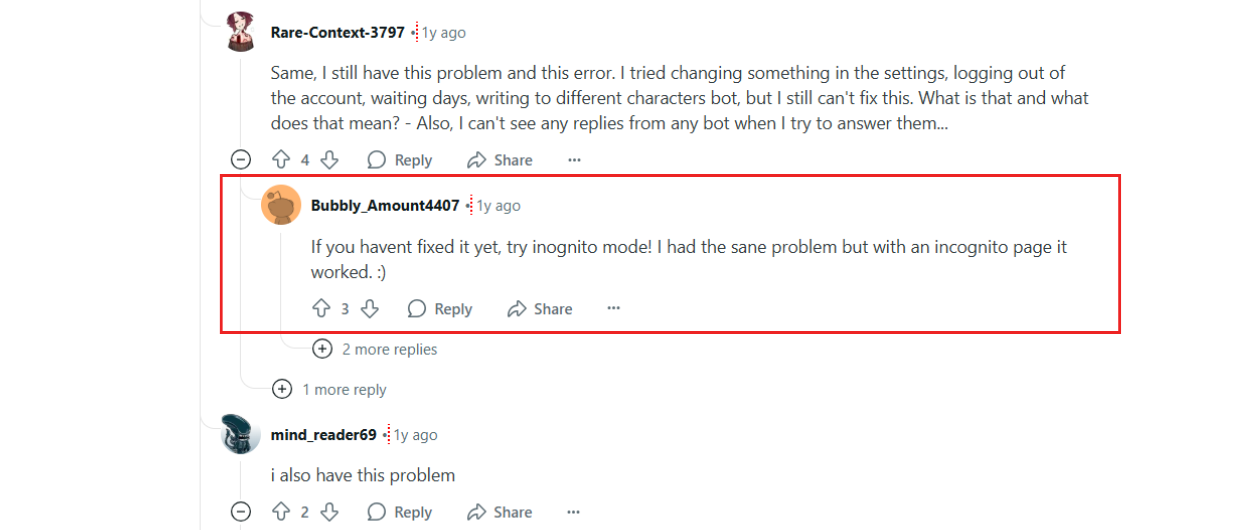
“Try incognito mode – it fixed for me” wrote by a user on Reddit. Try Chrome, Firefox or Brave with disable all extensions.
If you’re connecting Janitor AI with Open AI or Kobold AI API, ensure that you are using right API key. Check it is matching with the correct model type. You can also try re-setting your API key if issue persist.
Janitor AI shows a number of errors based on the nature of operation. There are three errors that I have potentially witnessed during accessing Janitor AI.
I have disclosed Janitor AI errors in brief.

The first error “Try if you can access this URL later” is shown when the OpenAI reverse proxy URL or Kobold AI API URL cannot be accessed. This happens due to some server issue or improper set up process.

This error is critical in nature and occurs when your bot gets no idea what to execute and remains unresponsive. It is recommended to contact the experiment designer to resolve the issue.

This type of error is genuine and can occur through unstable internet connection, problems with the server hosting the AI, or API-related problems. Solving this error is easy as it requires proper troubleshooting.
In Mid-July the website experienced a service disruption, with error reports marked from users in the United States. The noticeable error identified such as “Slow”, “Inaccessible”, and “Error Received” while using the service.
The volume of reports summed around 1200+ alerts originating from the U.S. region. 75% of reports from U.S. East and West Coasts—suggesting a regional routing or CDN issue.
Troubleshooting the immediate fix by switching regions or use VPN is advisable. Also, Incognito Mode + Cache Clear still helped ~30% of cases.
Janitor AI is used to create NSFW Anime character style based AI-chatbot. There are certain instances when Janitor AI is not working and those have been addressed in this blog with their solutions. I hope these solutions would help you solve Janitor AI not working and you again be able to use Janitor AI for your work.
Also read: Janitor AI: User Doubts, FAQs & Best Alternatives [Part 2]
Janitor AI not working or being temporarily down due to server issues or ongoing maintenance. Additionally, slowed internet connection may also cause this issue.
Might be there is a technical issue like false API integration or undefined object that isn't recognized by the bot. Try contacting tech support on Janitor AI’s Discord.
A wrong API integration can cause this problem. Or, network glitch at the time setting up API in Janitor AI results in showing failed to fetch kobold error.
If a new update rolls out, the website temporarily becomes inaccessible for a time. As soon as updates are completed, Janitor AI not working will be fixed automatically.
References:
Reddit JanitorAI_Official Thread
Disclaimer: The information written on this article is for education purposes only. We do not own them or are not partnered to these websites. For more information, read our terms and conditions.
FYI: Explore more tips and tricks here. For more tech tips and quick solutions, follow our Facebook page, for AI-driven insights and guides, follow our LinkedIn page.
In today’s fast-paced digital economy, businesses produce immense amounts of..
Generative AI has progressed at an astonishing rate. From text-to-image systems..

Customer service expectations have progressed faster than most support..
Organizations across industries face a general defiance, data overload, and..

Businesses and organizations today are under increasing pressure to generate..

The rapid evolution of artificial intelligence has changed how businesses..