

How To Use Nano Banana Inside Photoshop (Script & Plugin)


Nano Banana is a proprietary tool developed by Google and have been in huge demand right now. The tool is mostly used by designers and individuals who love to play with prompting skills.
Speaking of designer, many have been still using photoshop. And gone are the days when manual editing stretching the head of yours, thanks to AI generative technology.
Now designers can also use Nano Banana officially named Gemini 2.5 Flash Image model inside photoshop to play with editing, generating, and other tasks at a glance.
This blog guide you how to use nano banana inside photoshop. Before you proceed, let’s have a look the prerequisites which are must for seamless installation.
Prerequisites
Table of Contents
There are couple of things to setup before using Nano Banana inside photoshop. I have explained the entire process in four easy steps which is easy to learn.
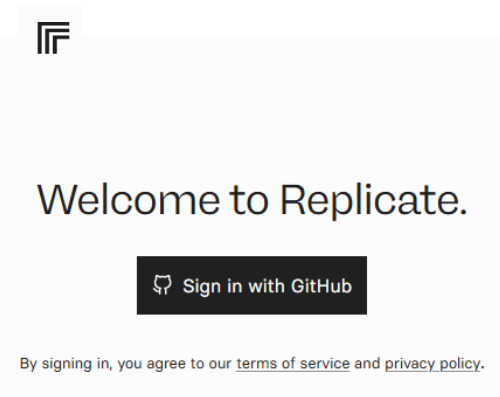
Replicate is a platform that let’s anyone run AI tools with an API. Create an account on Replicate using GitHub.
After sign up, head to Account Setting and click API Token option. Give your Token a name, for example, “Nana Banana” and click Create Token button.
Now, head to the Billing option and click Add Credit with minimum amount of $10 for a pocket-friendly start.
At right now, the only way to use nana banana inside photoshop is by purchasing custom-made photoshop script lets you create AI edits directly inside Photoshop.
Head to Nano banana flux photoshop script website to buy the script that we need. After purchase is done, you will get a “.jsx” file.
Copy the file to your Photoshop Script folder.
macOS: /Applications/Adobe Photoshop [version]/Presets/Scripts/
Windows: C:\Program Files\Adobe\Adobe Photoshop [version]\Presets\Scripts\
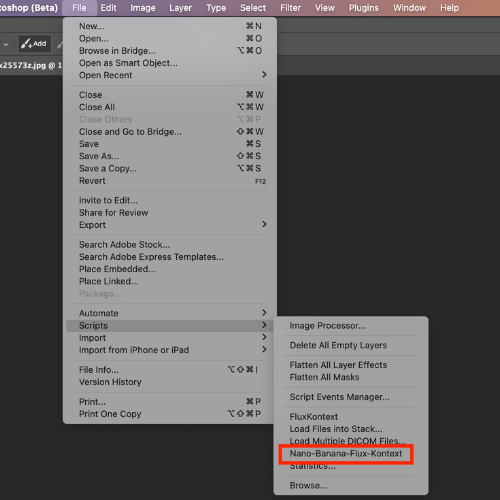
To enable the script, you must restart your computer. The script will show up under File → Scripts → Nano-Banana-Flux-Kontext.
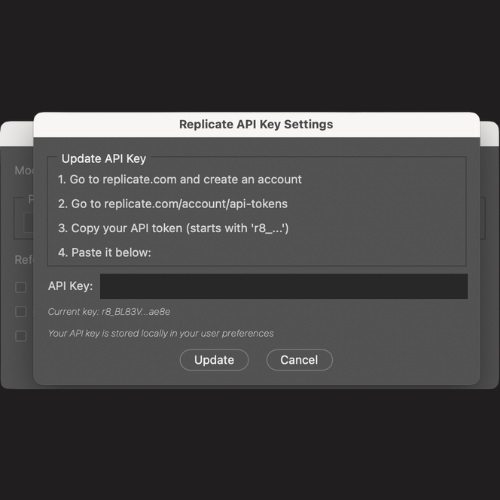
Just one more step to do. Initially, you need to configure API key to access the script for communicating and processing. The first time you open the script, the Settings will open first. Paste your
Replicate API token.
In Windows, you might get error notification that the API key isn’t valid. In that case, just click Update or OK, and it’ll probably just work.
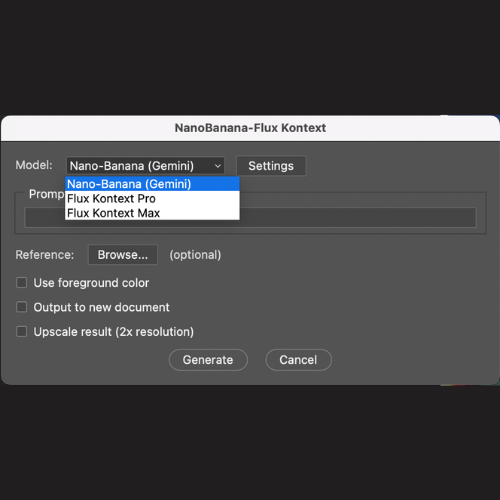
Now you are ready to use the nano banana inside photoshop.
Click Generate and the result appears as a new layer on top of your original.
Nano Banana is a new iteration of AI Image editing universe, significantly growing as it deliver exceptionally high-quality image output from both text and image reference. So, if you are in search of how to use nano banana inside photoshop, this guide is way out for help. Share it with your friends or needy. Thanks for reading 🙂
Google team has develop Nano Banana and is available to use in Gemini chatbot and AI Studio.
Interested user can access nano banana by using the nano banana photoshop script and configure the plugin to edit or generate directly in photoshop.
In photoshop, nano banana is a useful in various way such as generating image out of prompt, editing image by selecting the selection and prompting to guide what to do next. You can also upscale the selection using nano banana.
Zero coding knowledge is required but prompt techniques are must to come up with unique images or tweaking if necessary.
Disclaimer: The information written on this article is for education purposes only. We do not own them or are not partnered to these websites. For more information, read our terms and conditions.
FYI: Explore more tips and tricks here. For more tech tips and quick solutions, follow our Facebook page, for AI-driven insights and guides, follow our LinkedIn page.
Tuesday August 12, 2025
Friday July 4, 2025
Thursday June 12, 2025
Tuesday June 10, 2025
Wednesday May 28, 2025
Monday March 17, 2025
Tuesday March 11, 2025
Wednesday March 5, 2025
Tuesday February 11, 2025
Wednesday January 22, 2025

High-quality market intelligence is precious, fragmented, and often locked..

If your legacy Java application collides with large datasets, batch processing..

Customer support systems are designed to streamline communication, decrease..

Personalised PAT test labels are crucial elements in maintaining compliance and..

In today’s retail environment, in-store execution has become one of the most..

Paid guest posting is commonly positioned as a fast-track solution to enhance..