

How I Download & Use GLM 4.5 Locally? Step By Step Guide


Another gracious Large Language Model developed by Chinese AI company, Zhipu AI introduced two advanced model to date. The GLM 4.5 and GLM 4.5 Air are said to be the most intelligent model for use cases like reasoning, coding, and agentic use case.
The model is not currently available as a software to download. Developers can access through its official website, Hugging Face or Github repo.
In between, I figure out the way to download GLM 4.5 and run locally on your computer. Yes, you heard it right!
This article show you step by step to access GLM 4.5 download using python. By the end, you feel confident and able to run GLM 4.5 model locally on your computer.
Critical System Requirements
Table of Contents
You can download GLM 4.5 from its official SourceForge project page. Once downloaded and extracted, your project folder will include
The GLM 4.5 local setup uses modern Python libraries like transformers, vllm, and accelerate, which require Python 3.9 or later.

In your terminal, navigate to the project folder and run:
pip install -r requirements.txt
After installing necessary files, run this:
pip install -U vllm –pre –extra-index-url https://wheels.vllm.ai/nightly
Note: This enable the streaming support for vllm.
Start the core vllm model server that Zhipu AI internally use. This launches a local OpenAI-compatible API server on http://127.0.0.1:8000
python -m vllm.entrypoints.openai.api_server –model THUDM/glm-4-5
Note: If the model isn’t pre-downloaded, vLLM will fetch it automatically from Hugging Face.
Inside the Example folder, rename “config.example.json” to “config.json” and no edit in the file required.
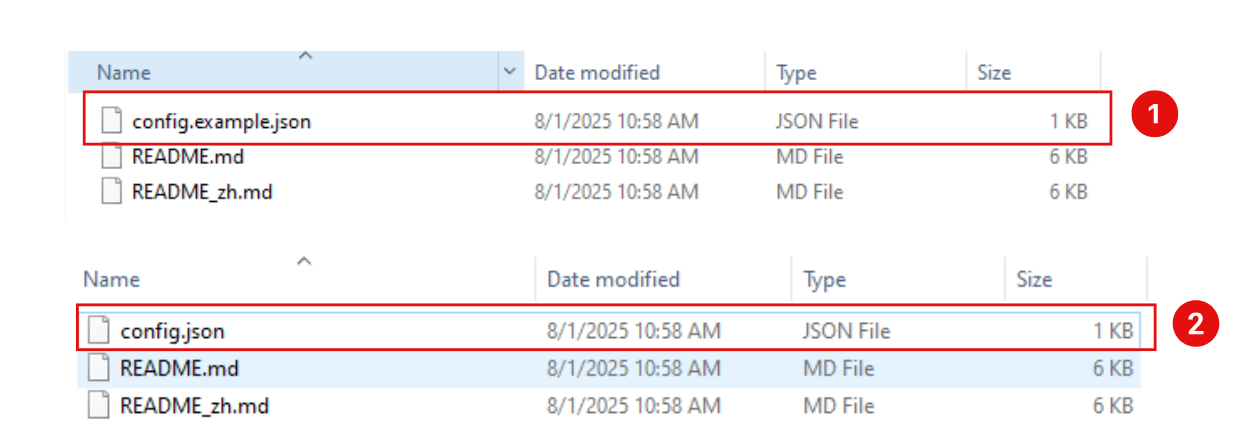
That’s all. Now run the inference with the following command. You’ll be prompted to enter text, and GLM 4.5 will respond directly in the terminal.
python inference/trans_infer_cli.py
Note: Running GLM 4.5 locally gives you full control over inference, privacy, and customization.
If you are trying to run GLM 4.5 or GLM 4.5 Air model on Python 3.13 version, it likely fail because it was released in 2012 and lacks async/await syntax, missing critical libraries and syntax features.

A range of model development is possible using intelligent GLM 4.5 model which are mentioned below.
The GLM series (General Language Model) at its early stage have gained widespread popularity, more than 700,000 developers use this model.
Z.ai new model GLM 4.5 break the record in competition with prevailing LLMs. In overall performance, across 12 benchmarks including 3 for agentic tasks, 7 for reasoning, and 2 for coding — GLM 4.5 ranks 3rd.
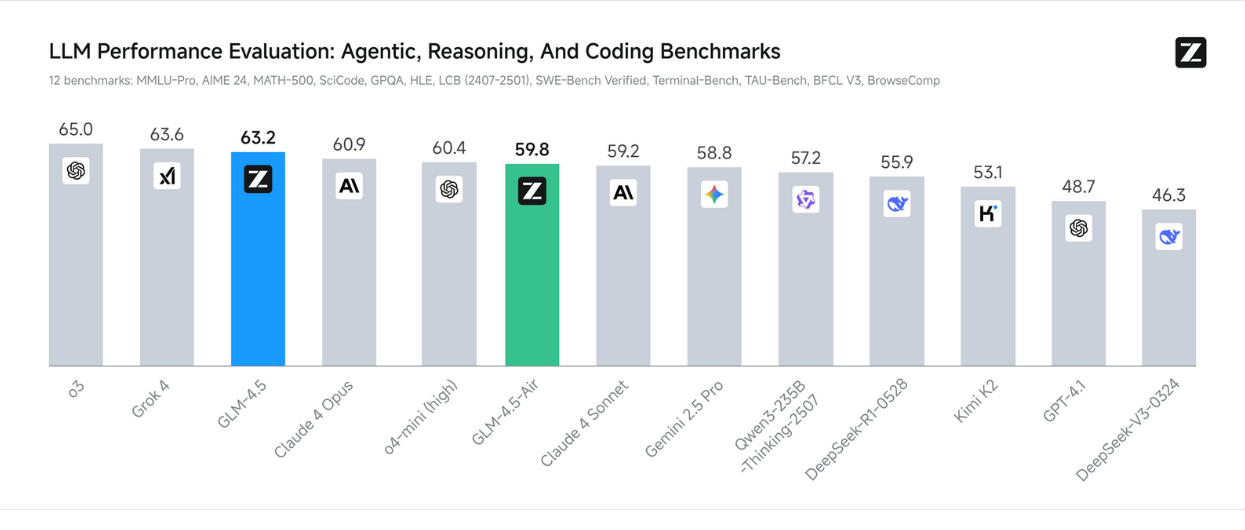
The release of GLM 4.5 and GLM 4.5 Air will disrupt the industry likely with its record-breaking performance in the filed of coding, reasoning, and agentic tasks.
👉 Check this conversation with Zhipus AI’s GLM 4.5 model
Zhipu AI, a Chinese AI research company developed this model.
GPT-4 and Claude 3 Opus are considered top performers in coding benchmarks. But, GLM 4.5 is giving tough competition at par.
GLM 4.5 outperforms both DeepSeek R1 and Kimi K2 in several reasoning and agentic benchmarks.
Yes, GLM 4.5 supports agentic workflows and can perform tasks autonomously when integrated properly.
Disclaimer: The information written on this article is for education purposes only. We do not own them or are not partnered to these websites. For more information, read our terms and conditions.
FYI: Explore more tips and tricks here. For more tech tips and quick solutions, follow our Facebook page, for AI-driven insights and guides, follow our LinkedIn page.
Tuesday August 12, 2025
Friday July 4, 2025
Thursday June 12, 2025
Tuesday June 10, 2025
Wednesday May 28, 2025
Monday March 17, 2025
Tuesday March 11, 2025
Wednesday March 5, 2025
Tuesday February 11, 2025
Wednesday January 22, 2025

High-quality market intelligence is precious, fragmented, and often locked..

If your legacy Java application collides with large datasets, batch processing..

Customer support systems are designed to streamline communication, decrease..

Personalised PAT test labels are crucial elements in maintaining compliance and..

In today’s retail environment, in-store execution has become one of the most..

Paid guest posting is commonly positioned as a fast-track solution to enhance..