

What Is Google AI Mode? How To Enable On Mobile & Desktop?


Google AI Mode is a new feature that embodies Google’s vision to improve search and provide relevant information to people, quickly and easily.
Providing a new search experience in a conversational style. Users receive answers to their complex queries promptly, thanks to Gemini 2.5’s in-house superior model.
Table of Contents
Google AI Mode is a powerful AI search feature, similar to ChatGPT, that answers complex queries using a “query fan-out” technique, which makes it different from AI Overviews summary.
AI mode answers are powered by large language models. It doesn’t show “10-blue links” and “ads” – it delivers direct, natural language answers including inline citations (like AI Overviews offer) and shows relevant websites in the right-side bar.
For marketers, it is an opportunity to show their brand in AI mode as it shows references to relevant websites to search. By using answer engine optimization (AEO) technique, brands can appear in the AI mode citation links.
Google AI Mode uses query fan-out technique also known as thematic search where a single user search is broken down into multiple, related sub-queries that are executed simultaneously.
This technique help AI Mode to dig deeper into the search query and show highly-relevant and helpful answer.
Below is exactly how AI Mode answer to users’ query:

Utilizing an integrated model (Gemini 2.5) that handles queries entered by the user by breaking them into single words. In visual, you may see thinking logic in action with counts (representing an AI model searching for multiple websites) and generating answers by synthesising content from the multiple websites.

As I said earlier, AI Mode intact thematic search process to overhaul its model capability to generate answers accurately.
When its model understands the query completely, it generates a long summarised answer in a clear and structured format. In between, it shows websites in the right corner with the first being the highest relevant content source.
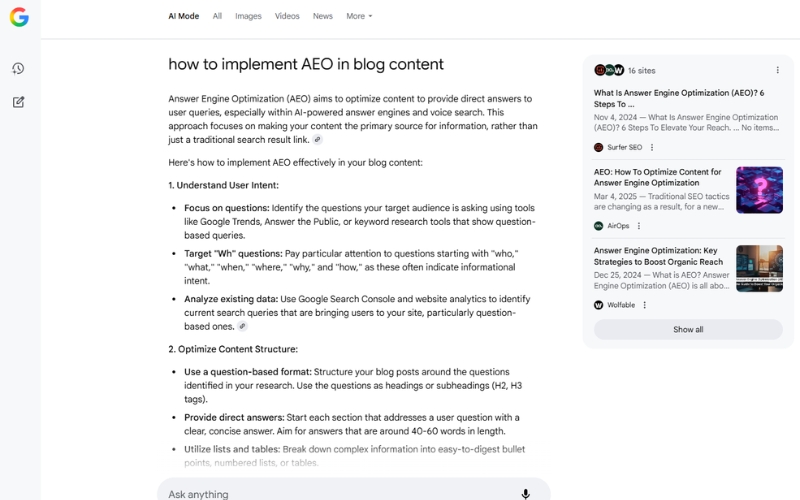
After an initial answer, users can follow-up questions if they want more answers in the particular from the AI Mode which is another distinct feature from AI Overviews.
They could ask about intent-based questions to get more additional information of the question. For example; I asked about how to implement AEO in blog content and bang!, it gives the answer.
And you can keep asking follow-up questions for more information.
You need gmail account to access AI Mode in mobile and desktop. Following are the step by step guide to enable AI mode in search on mobile (Android and iOS) and desktop.
1. Open Google App on your smartphone.

2. Search for “labs.google” and open first website.
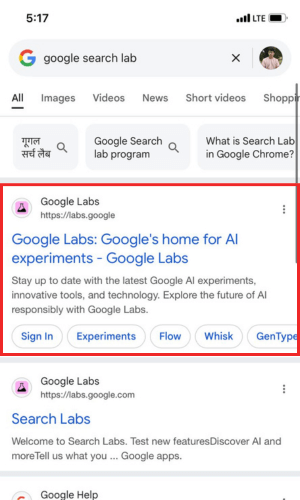
3. Scroll down to bottom and click on “Search Lab” option.

4. You will see intuitive UI design with a “Turn on” button. Click on this button. Next, click on “Try AI Mode” button to enable this feature in search.

5. You will see “AI Mode” tab appear in the menu. Search your query in the AI Mode and get answers quickly.
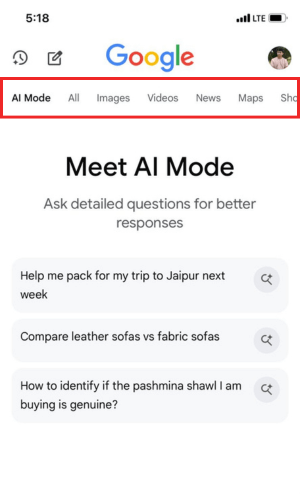
Follow the below process to enable AI Mode search experience in desktop.
1. Go to labs.google.com/search/
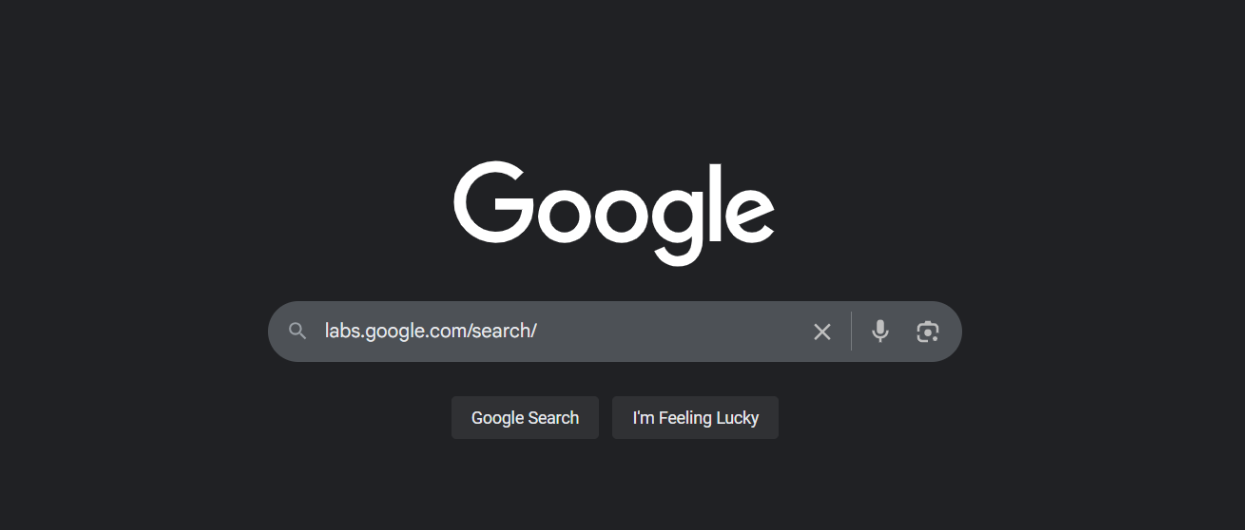
2. Click on “Join to Try” button appear under new experiment sub heading.

3. Enter email address for which you want to access AI Mode into. After login, click on “Turn On” option.

4. After turning on, accept if you want to receive email updates or skip if you don’t want. Click on “Try AI Mode” button to use in search.

AI Mode hosts several features which are mentioned below.
AI Mode making a widespread application in the following areas.
In my view, AI Mode is a beneficial feature to get a different kind of search experience and personalized responses in a fast-moving world.
Though Google AI Mode shares a few similar familiarities to the AI Overviews and other conversational chatbot such as ChatGPT, it precedently made its presence among global users.
Slowly, businesses and individuals are shifting to AI Mode, with the goal of gaining visibility in the citation sources, to build trust and traffic.
If you’re a business or content creator, now is the time to optimize for AI-driven search experiences by adopting AEO practices.
That’s all in this blog. Thanks for reading.
Yes, Google AI Mode is free for all users with the latest Google app or Chrome Canary.
AI Mode is available in the United States and India only. More regions will roll out in Q3 2025.
Google AI Mode surfaces citations automatically if your content matches the query and follows best‑practice schema markup like FAQPage, HowTo, and Article.
References Mentioned
Disclaimer: The information written on this article is for education purposes only. We do not own them or are not partnered to these websites. For more information, read our terms and conditions.
FYI: Explore more tips and tricks here. For more tech tips and quick solutions, follow our Facebook page, for AI-driven insights and guides, follow our LinkedIn page.
Tuesday August 12, 2025
Friday July 4, 2025
Thursday June 12, 2025
Tuesday June 10, 2025
Wednesday May 28, 2025
Monday March 17, 2025
Tuesday March 11, 2025
Wednesday March 5, 2025
Tuesday February 11, 2025
Wednesday January 22, 2025

High-quality market intelligence is precious, fragmented, and often locked..

If your legacy Java application collides with large datasets, batch processing..

Customer support systems are designed to streamline communication, decrease..

Personalised PAT test labels are crucial elements in maintaining compliance and..

In today’s retail environment, in-store execution has become one of the most..

Paid guest posting is commonly positioned as a fast-track solution to enhance..