

Managing screens across multiple locations used to be a logistical nightmare. Teams relied on USB drives, manual updates, and on-site troubleshooting.
Today, remotely manage digital signage has completely changed that. With the right software, you can control every screen, in every location, from a single dashboard.
Why Remote Screen Management Matters in B2B
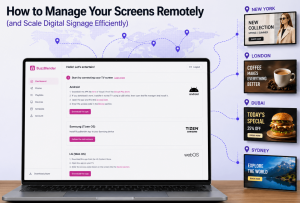
This guide explains how it works, why it matters, and how tools like Buzzblender help B2B teams scale faster with less friction. The price is just $5 per Screen per Month. It’s the best tool (features and pricing) for managing content on screens across your LG Displays. Buzzblender also has native apps for Android and Samsung (TizenOS). By the way, learn more about Magicinfo alternatives in this guide.
Digital signage is no longer just about displaying content. It’s a core part of demand generation, in-store experience, and brand consistency.
Without remote management, companies face:
- Inconsistent messaging across locations
- Slow campaign rollouts
- High operational costs
- Limited control over real-time updates
Remote management solves these issues by centralizing control and automating distribution.
What is Remote Digital Signage Management?
Definition
Remote digital signage management allows you to control content, screens, and schedules from a cloud-based platform.
Key Capabilities
Centralized Dashboard
Manage all screens from one interface, regardless of location.
Content Scheduling
Plan campaigns in advance and automate publishing.
Real-Time Updates
Push urgent updates instantly across all displays.
Device Monitoring
Track screen health, uptime, and performance remotely.
How Buzzblender Simplifies Remote Screen Control
Unified Content Management
With Buzzblender, teams can upload, organize, and distribute content across multiple screens in minutes.
Smart Scheduling
Schedule content by time, location, or audience segment. This is especially useful for businesses running multi-location campaigns.
Scalable Infrastructure
Whether you manage 5 screens or 500, the platform scales without increasing operational complexity.
Integration-Friendly
Buzzblender integrates with existing marketing workflows, making it easier to align signage with demand generation campaigns.
Real Case Example: Café Using LG Screens
The Challenge
A mid-sized café chain wanted to modernize its in-store experience.
They installed multiple LG commercial display screens across locations.
However, they quickly ran into problems:
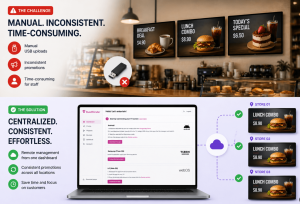
- Content updates required manual USB uploads
- Promotions were inconsistent across stores
- Staff spent time managing screens instead of customers
The Solution
The café adopted the Buzzblender digital signage player for WebOS for remote management.
They connected all LG screens to the platform and centralized control. They created videos using AI tools. Check this article to find the best tool to use.
Implementation Steps
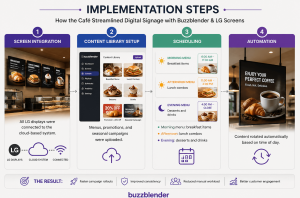
Step 1 – Screen Integration
All LG displays were connected to the cloud-based system.
Step 2 – Content Library Setup
Menus, promotions, and seasonal campaigns were uploaded.
Step 3 – Scheduling
- Morning menu: breakfast items
- Afternoon: lunch combos
- Evening: desserts and drinks
Step 4 – Automation
Content rotated automatically based on time of day.
Results
Within weeks, the café saw:
- Faster campaign rollouts across all locations
- Improved visual consistency
- Reduced manual workload
- Better customer engagement at the point of sale
Most importantly, marketing and operations finally worked in sync.
How Remote Management Supports Demand Generation
Digital signage is often overlooked in B2B demand generation strategies.
However, it plays a critical role in influencing buyer behavior.
Brand Consistency
Consistent visuals across screens reinforce trust and recognition.
Real-Time Campaign Activation
Launch promotions instantly without relying on local teams.
Personalization at Scale
Tailor content based on location, time, or audience.
Omnichannel Alignment
Sync messaging with email, ads, and ABM campaigns.
Best Practices for Managing Screens Remotely
Automate Scheduling
Reduce manual work by pre-planning campaigns.
Monitor Performance
Track which content performs best and optimize accordingly.
Align with Marketing Strategy
Ensure signage supports broader demand generation goals.
Use Reliable Software
Choose scalable tools like Buzzblender to avoid operational bottlenecks.
Common Mistakes to Avoid
- Relying on manual updates
- Ignoring screen analytics
- Using inconsistent branding
- Not integrating signage with marketing campaigns
These issues can slow down execution and reduce ROI.
Conclusion
Remote screen management is no longer optional.
It’s a critical capability for businesses looking to scale efficiently.
With platforms like Buzzblender, companies can streamline operations, improve brand consistency, and accelerate campaign execution.
As digital signage becomes more integrated with B2B marketing strategies, the ability to manage screens remotely will directly impact performance, engagement, and growth.
Top 10 News
-
01
Top 10 Deep Learning Multimodal Models & Their Uses
Tuesday August 12, 2025
-
02
10 Google AI Mode Facts That Every SEOs Should Know (And Wha...
Friday July 4, 2025
-
03
Top 10 visionOS 26 Features & Announcement (With Video)
Thursday June 12, 2025
-
04
Top 10 Veo 3 AI Video Generators in 2025 (Compared & Te...
Tuesday June 10, 2025
-
05
Top 10 AI GPUs That Can Increase Work Productivity By 30% (W...
Wednesday May 28, 2025
-
06
[10 BEST] AI Influencer Generator Apps Trending Right Now
Monday March 17, 2025
-
07
The 10 Best Companies Providing Electric Fencing For Busines...
Tuesday March 11, 2025
-
08
Top 10 Social Security Fairness Act Benefits In 2025
Wednesday March 5, 2025
-
09
Top 10 AI Infrastructure Companies In The World
Tuesday February 11, 2025
-
10
What Are Top 10 Blood Thinners To Minimize Heart Disease?
Wednesday January 22, 2025
Related Posts

Review
A Look At Why Trust Signals Are Central To Search Performanc...
By: Neeraj Gupta, Tue July 7, 2026
Search performance is no longer just about keywords, backlinks, and technical..

Review
How Mechanical Failures Lead To Truck Accidents
By: Ankita Sharma, Fri June 5, 2026
When large trucks cause accidents, establishing a mechanical failure isnre..

Review
What Is Global Market Analysis Through Zlibrary And How Does...
By: Neeraj Gupta, Sun March 8, 2026
High-quality market intelligence is precious, fragmented, and often locked..
Review
Is AWS Transform For Legacy Java Applications Worth It For D...
By: Neeraj Gupta, Sun March 8, 2026
If your legacy Java application collides with large datasets, batch processing..
Review
Why Traditional IVR Call Routing Fails With Complex Customer...
By: Neeraj Gupta, Sat March 7, 2026
Customer support systems are designed to streamline communication, decrease..

Review
The Benefits Of Using Personalised PAT Test Labels For Profe...
By: Ankita Sharma, Fri January 30, 2026
Personalised PAT test labels are crucial elements in maintaining compliance and..